• Backup & transfer data
      • O&O DiskImage Professional data backup for your PCs
      • Rescue data & systems
      • O&O DiskRecovery Professional data recovery made easy
      • O&O BlueCon Disaster recovery when a pc or server no longer starts
      • PC Migration Windows 11
      • Migration Kit for Windows 11 The Easy PC Migration
      • Optimize systems
      • O&O Defrag Speed up your Windows PC
      • O&O DiskCommander Disk Analysis & Backup Testing
      • Cloud solutions
      • O&O Syspectr Free IT management solution from the cloud
      • O&O FileDirect Send files. Easily. Securely.
      • Protect data & systems
      • O&O SafeErase Secure data deletion
      • Freeware
      • O&O ShutUp10++ Antispy tool for Windows 10 and 11
      • O&O RegEditor Editing the Windows Registry
      • O&O AppBuster Bust Apps you do not want
      • O&O Lanytix Quick and easy Network Analysis in the LAN
      • O&O DeskInfo All important system information directly on the desktop
      • NEW: O&O ToolBox Our top products in
        a package at a special price!
      • View all products Discover all our tools for Windows
      • Downloads Get installation and portable applications
      • O&O Blog Stay up-to-date with our blog
      • Corporate Solutions Benefits for your company
      • Protect Enterprise Data
      • O&O DiskImage Backup solution for your business
      • O&O DiskImage Enterprise Data backup and system recovery at industrial levels
      • Productivity Boost
      • O&O Defrag Maximum performance for your Windows servers and PCs
      • Enterprise-Wide Data Recovery
      • O&O DiskRecovery Professional data recovery at the push of a button
      • O&O BlueCon The recovery system when a computer or server no longer starts
      • Protect Your Enterprise Data
      • O&O SafeErase Secure data deletion for critical business data
      • Freeware
      • O&O ShutUp10++ Compliance use of Windows in businesses
      • Your IT Management in the Cloud
      • O&O Syspectr Remote Monitoring and Management for Windows
      • O&O Blog Stay up-to-date with our blog
      • O&O PowerPack Enterprise The complete solution for your servers and PCs at a bargain price!
    • View all products >>>
      • Ressources
      • Documentation Documents related to O&O products
      • User's guides online Read manuals online
      • Downloads Download archive
      • Whitepapers Studies and whitepapers
      • FAQ Frequently asked questions
      • First aid First aid in the event of data loss
      • Get support
      • Overview Our service offers
      • Registration Register your O&O product
      • Trial users Support for trial users
      • Registered customers Support for registered customers
      • License recovery Resend your O&O license
      • Partner
      • O&O Partner Program Your advantages as an O&O Partner
      • O&O Partners Authorized O&O Partners in your region
      • Company
      • About us Leading manufacturer of system tools
      • Product releases List release dates and versions
      • The O&O Group Made in Berlin. Made in Germany.
      • Team Our management team
      • Contact us How to contact O&O
    • Contact
    • Newsletter

Business Private Partners

O&O DeskInfo

All system information on the desktop
Freeware

Download for free
O&O DeskInfo - All system information on the desktop
Windows 10 Windows 11
Looking for a backup solution? Find out more here.
  • Overview
  • Features
  • Screenshots
  • Support
  • What’s New

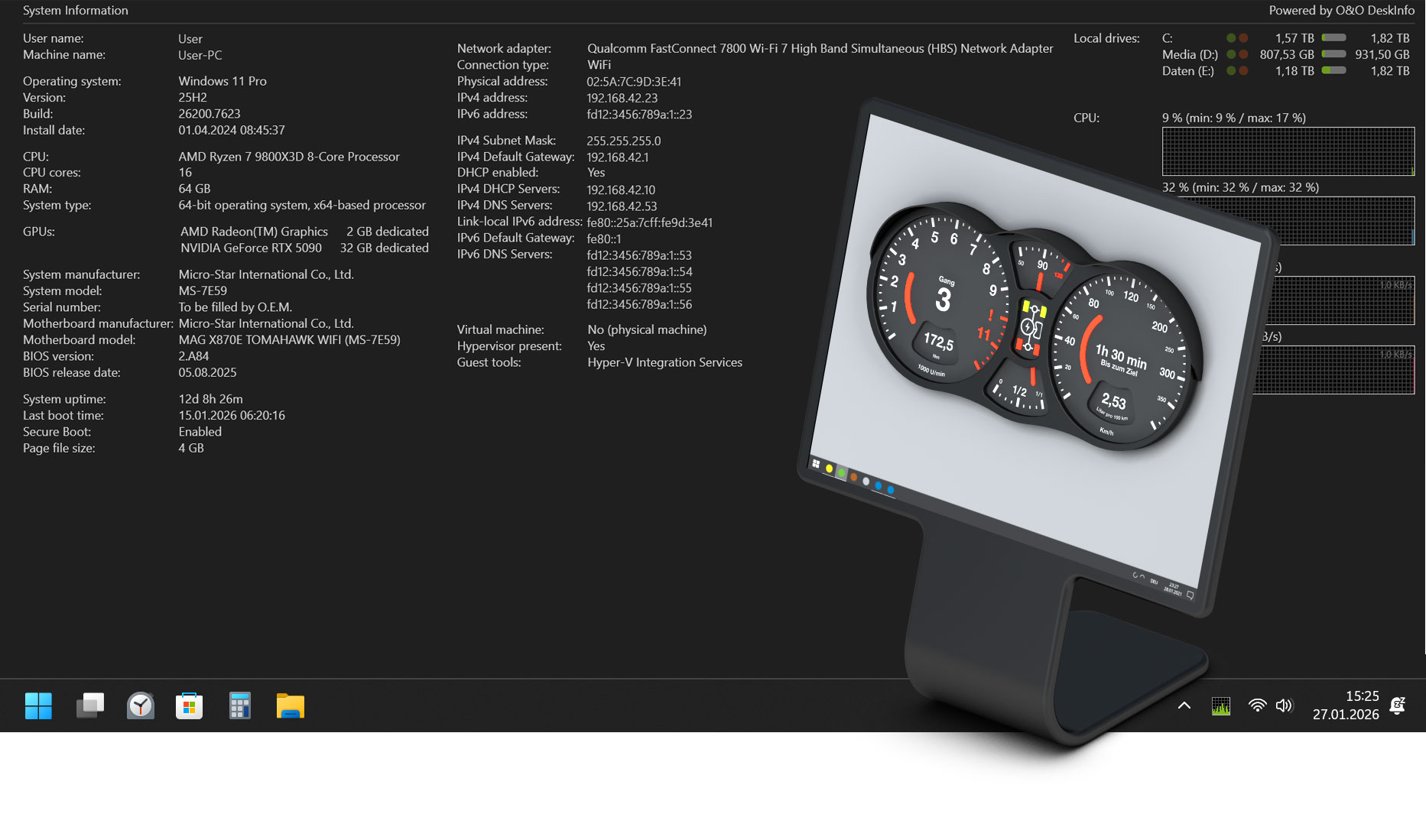
CPU, memory, drives, networking, and more — always in view

With O&O DeskInfo, you can keep an eye on all relevant system information at all times – clearly arranged and directly on your desktop. The compact display informs you in real time about processor and memory usage, the health and free space of your drives, as well as network connections and current activity. This allows you to see at a glance how your system is doing without having to open additional tools or complicated menus.

The display can be individually adapted and tailored exactly to your needs. Decide for yourself what information is displayed and how it is presented. Whether detailed hardware data, current performance values or network status – O&O DeskInfo shows exactly what is really relevant to you.

Share system information quickly and easily

For support requests or for targeted problem analysis, all recorded system information can be conveniently passed on. The displayed data can be copied directly to the clipboard via the context menu and then sent by e-mail or via a web form. This saves time and ensures that all important information is available in full.

Even more overview thanks to improved performance diagrams

O&O DeskInfo has new and optimized performance charts for CPU, memory and network. These react faster to changes in display settings, use the available space more efficiently and provide a quieter, clearer display. At the same time, the size and appearance of the diagrams can be adjusted more flexibly, so that they fit harmoniously into any desktop environment.

Advanced System Discovery for Modern Work Environments

The application now reliably detects virtual machines and adjusts the display of system information accordingly. In addition, if supported by the system, the current battery status is displayed. This is particularly helpful for mobile devices, as the charge level can be kept in view at all times – without any additional programs.

More control with an advanced profile editor

The profile editor has been comprehensively revised and offers significantly more flexibility. Columns can be freely selected and categories can be sorted individually, so that you can adapt the display exactly to your requirements. Uniform controls ensure a consistent, tidy and intuitive user interface.

Clearer view of drives and network components

O&O DeskInfo now clearly distinguishes between local, removable and network drives. The detection of drives and network adapters has also been further improved, which increases the reliability of the displayed information and allows for a clear classification of all components.

Stable, international and better documented

Performance monitoring is more stable overall and benefits from improved error handling of system and network queries. At the same time, the international presentation has been optimized by correctly taking into account regional number and date formats. Extended documentation makes it easier to get started and supports the efficient use of all functions. O&O DeskInfo is available in German, English and French.

Customizable – color, position, and monitor

O&O DeskInfo adapts flexibly to your workplace. Position, font size, colors and transparency can be adjusted according to your personal preferences. Even when using multiple monitors, you can specify which screen the display should appear on. This keeps your desktop clutter-free and tidy.

More security through intelligent notices

For additional security, O&O DeskInfo automatically informs about the connection of unknown USB devices. This not only keeps an eye on system performance, but also alerts you to potential security risks at an early stage.

Download, start, done

O&O DeskInfo is completely portable and does not require any installation. Simply download, start and start using immediately. If desired, the tool can be started automatically with Windows, so that the system information is available to you at any time without any additional effort.

Free to use

O&O DeskInfo can be used free of charge and can be passed on without restriction – within the team, to colleagues or in the private sphere. Without registration, without license costs and without functional restrictions.

About us Newsletter For Partners Contact
Our Products Order Downloads Protecting Your Security - Securing Your Privacy
Support FAQ Platform Status News & Releases
Social Commitment Press Releases O&O Labs The O&O Group
© 1997-2026 O&O Software GmbH, Berlin
Privacy Policy Terms & Conditions EULA Cancel subscriptions Imprint
